
iOS Custom Drills: One System, Your Rules
Shooting training is not universal. Different schools, disciplines, instructors, and competitive formats rely on different targets, distances, scoring models, and performance standards. That diversity reflects how shooting is actually practiced.
LaserHIT Custom Drills were created to support that reality. Not by replacing existing methods, but by providing one reliable measurement system that adapts to them.
Custom Drills allow you to apply your own standards while maintaining consistent, defensible measurement across sessions.
The goal is not to standardize how you train. The goal is to ensure that whatever standard you choose can be measured accurately, repeatably, and without interpretation.
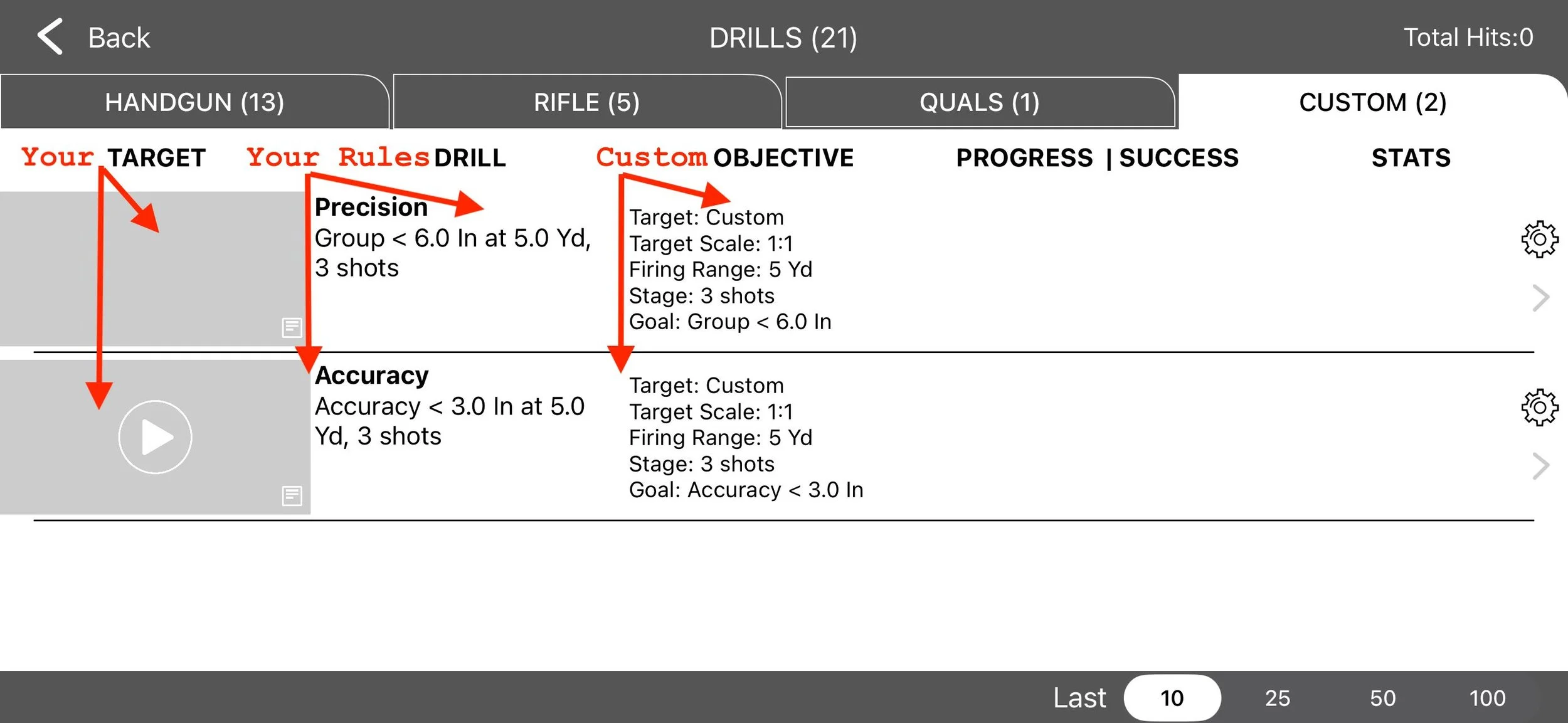
Custom Drills as a Foundation for Shooting Mastery
Shooting mastery develops in three steps, always in the same order:
Precision. How tight and consistent your shot group is.
Accuracy. How precisely those shots land where intended.
Timing. How efficiently precision and accuracy are maintained under pressure.
Custom Drills support all three while giving you the ability to create and manage your own preset formats.
There are two foundational types: Precision and Accuracy.
Both allow full control over stage timing from 10 seconds up to 5 minutes. This is intentional. You establish a stable baseline first. Only after consistency is achieved does time pressure become meaningful.
Timing is not a shortcut. It is a stress layer applied after discipline is confirmed.
Rules That Preserve Honest Results
Custom Drills are built on the same measurement engine used across the LaserHIT platform. Results are evaluated using real-world units, correct target scaling, controlled geometry, and consistent reference standards.
This is why a LASERHIT Reload Mark is required and why target scale must be defined. Measurement without geometry is estimation.
Here is the critical behavior to understand.
Before you complete the first stage, you have full editing access. After the first completed stage, the drill configuration locks.
This is not a limitation. It is data protection.
Once locked, the only value you can adjust is the goal. Distance, scale, units, shot count, and timeout remain fixed.
If you need to change those variables, you must Reset the drill. Resetting permanently deletes recorded statistics.
This is intentional. Progress only has meaning when conditions remain stable.
How to Start a Custom Drill - EDIT
There are always two default Custom Drills available: one Precision and one Accuracy. Both are visible at the top of the list and do not require PRO Access.
Before starting the first stage, tap the Settings icon and define your configuration:
• goal
• indoor firing distance from 3 feet to 17.6 yards
• target scale from 1:1 to 1:100
• measurement units including inches, cm, SMOA, TMOA, MIL, MRAD
• hit hole size
• shots per stage
• stage timeout from 10 seconds to 5 minutes
• screen mirroring option
Complete your first stage only after your configuration is correct.
At that moment, the drill locks and the target image used is saved and displayed on your Custom Drills screen. This creates a visual reference of what target was paired with what setup.
From that point forward, only the goal may be adjusted. Any structural change requires a Reset.
Creating New Custom Drills with PRO Access
If you need multiple standards, PRO Access unlocks New Drill creation.
New Custom Precision or Custom Accuracy drills are independent copies of the default drill. Each can be edited, named, deleted, and stored locally on your device.
You can maintain different targets, scales, distances, or timing structures without overwriting prior data.
Regardless of configuration, every Custom Drill serves one of two purposes: Precision or Accuracy.
If PRO Access expires, all statistics remain stored and viewable. Full tracking resumes when PRO is renewed.
How Custom Drills Work in Practice
The workflow is deliberate:
Mount your target on a wall or whiteboard
Place the iPhone or iPad on a tripod facing the target
Insert the laser cartridge into the firearm
Open LaserHIT → Drills and select Custom Drills
Edit the drill first
Define your configuration
Complete Express Setup
Move to the firing line and begin
From that point forward, the drill runs exactly as defined.
Measurement Without Compromise
LaserHIT displays results in the real-world units you selected, referenced to a true 1:1 scale target. Every completed stage becomes part of a continuous progress record.
Over time, the system tracks:
• most recent result
• change from the previous stage
• success relative to the goal
• overall success rate
• improvement or regression trends
• downtime between sessions
Nothing is averaged away. Nothing is adjusted after the fact.
The data reflects exactly what happened under consistent conditions.
Before You Go
Targets can differ.
Distances can vary.
Timing can be stretched or tightened.
Custom Drills exist because serious shooters outgrow fixed templates. Standards evolve. Measurement must remain credible.
You define the standard.
LaserHIT makes sure the measurement stays real.