
LASERHIT DRILLS. FROM SETUP TO RESULTS.
WHAT IS A LASERHIT DRILL, AND WHY WOULD YOU NEED ONE?
You already know how to use your firearm. You know your sights, your trigger, and the shooting skills you want to maintain or improve.
Now, bring something new to your dry-fire training with LaserHIT Drills.
No need to create an exercise from scratch.
Accuracy, precision, reaction time, target transitions, zone scoring, or longer-distance rifle practice...Different Drills focus on different aspects of shooting performance.
The LaserHIT App registers your shots, evaluates your results according to each Drill's rules, and provides performance information you can review over time.
And you don't need to purchase a LaserHIT HD cartridge to explore these features. The Android App also supports compatible generic laser training cartridges. Simply select the appropriate Cartridge Type during Firing Range setup.
For shooters who prefer traditional, open-ended practice, Classic LaserHIT Practices remain available. Check or uncheck the Drills box on the App's opening screen to switch between the two modes.
START WITH THE DRILL'S OBJECTIVES.
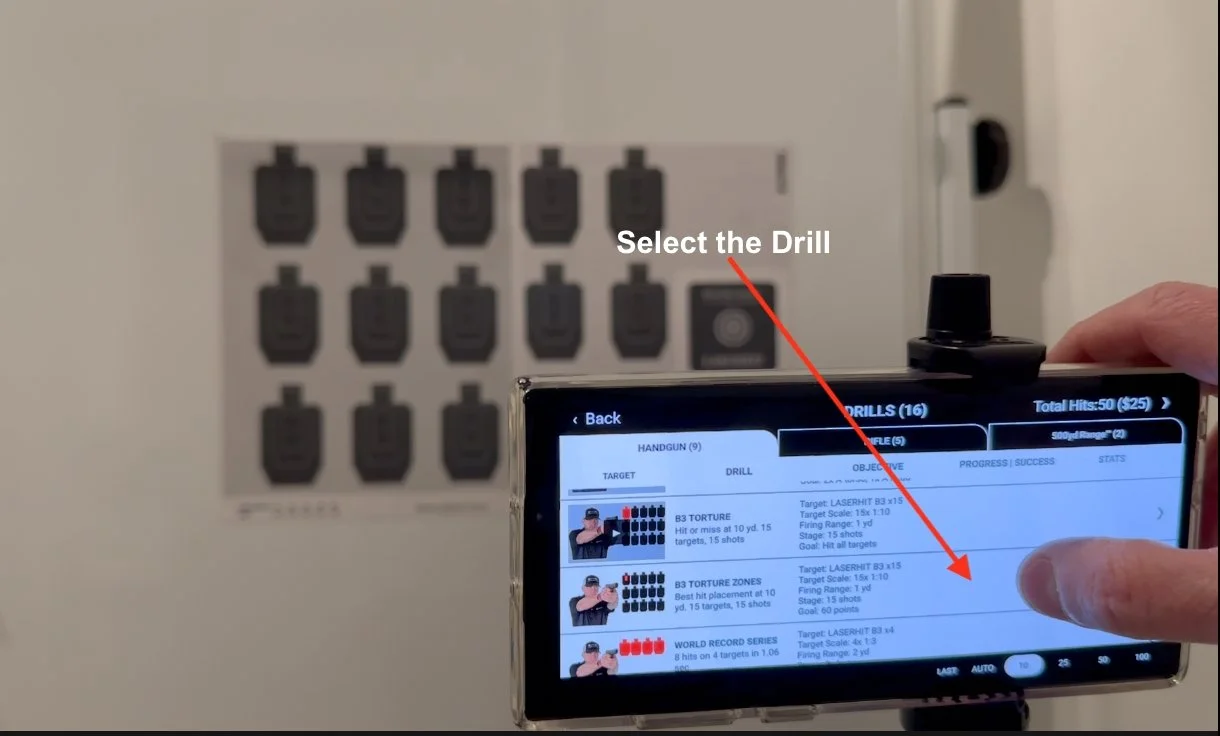
Before setting up your targets, choose the shooting skill you want to work on.
Open the Handgun or Rifle category and select a Drill.
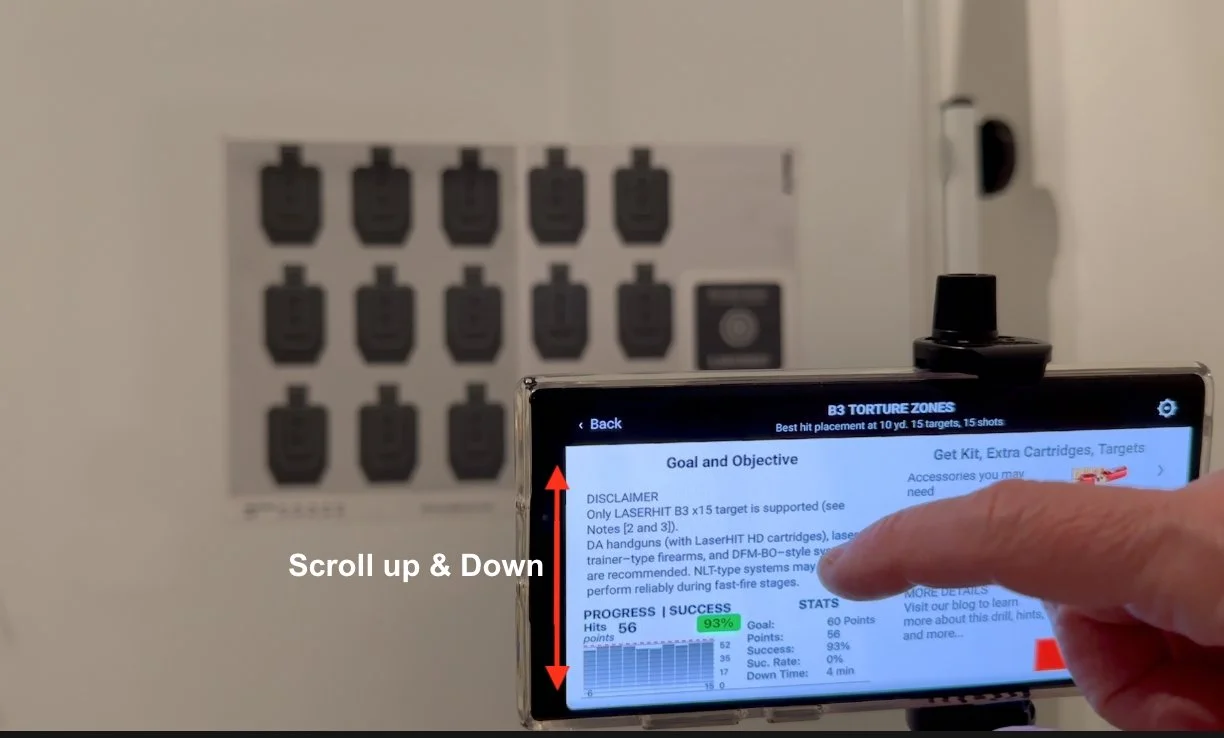
Each Drill has its own Objectives page, explaining the required equipment, target configuration, firing distance, shot count, time limit, scoring rules, and training goal.
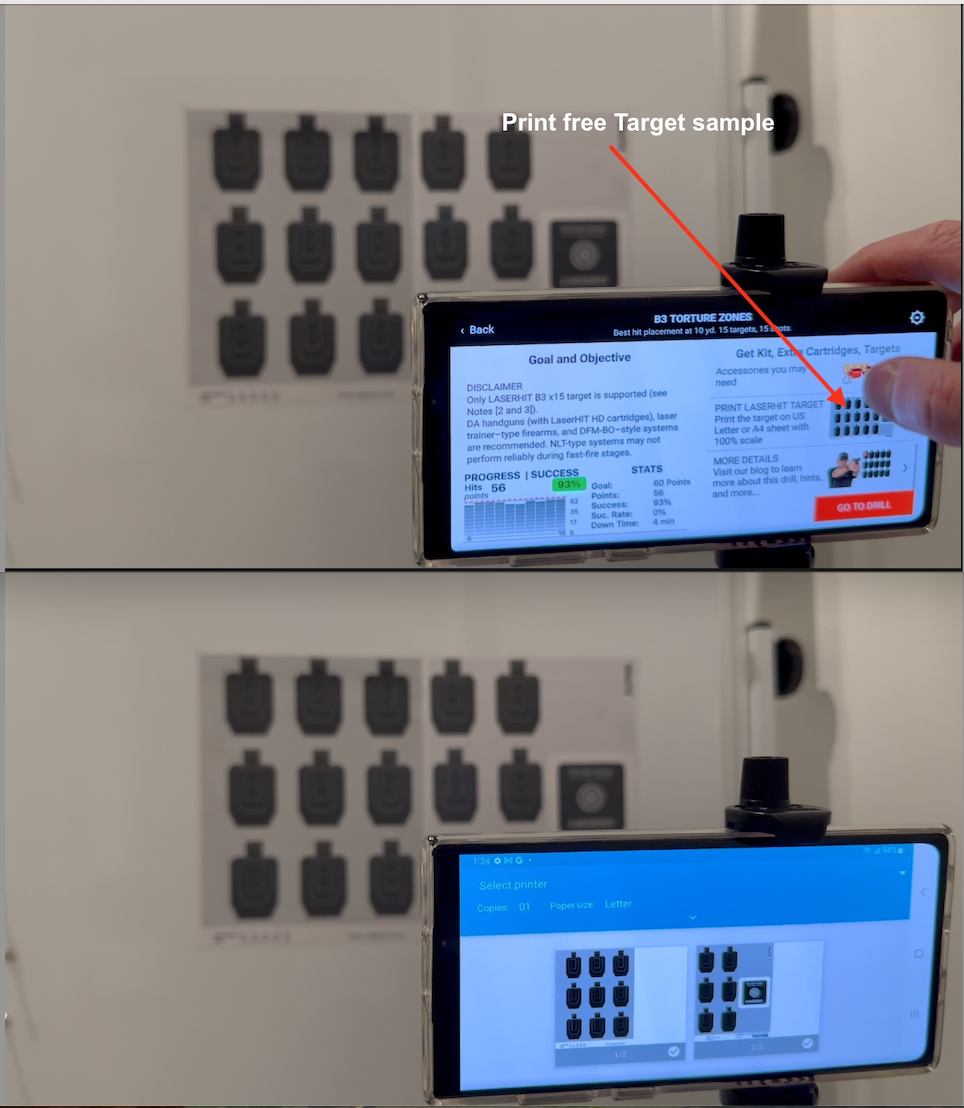
You'll also find links to relevant LaserHIT products and free downloads of the recommended targets.
Pay attention to the Disclaimer. Some Drills require a specific LaserHIT target, while others support multiple target designs, scales, or your own custom targets.
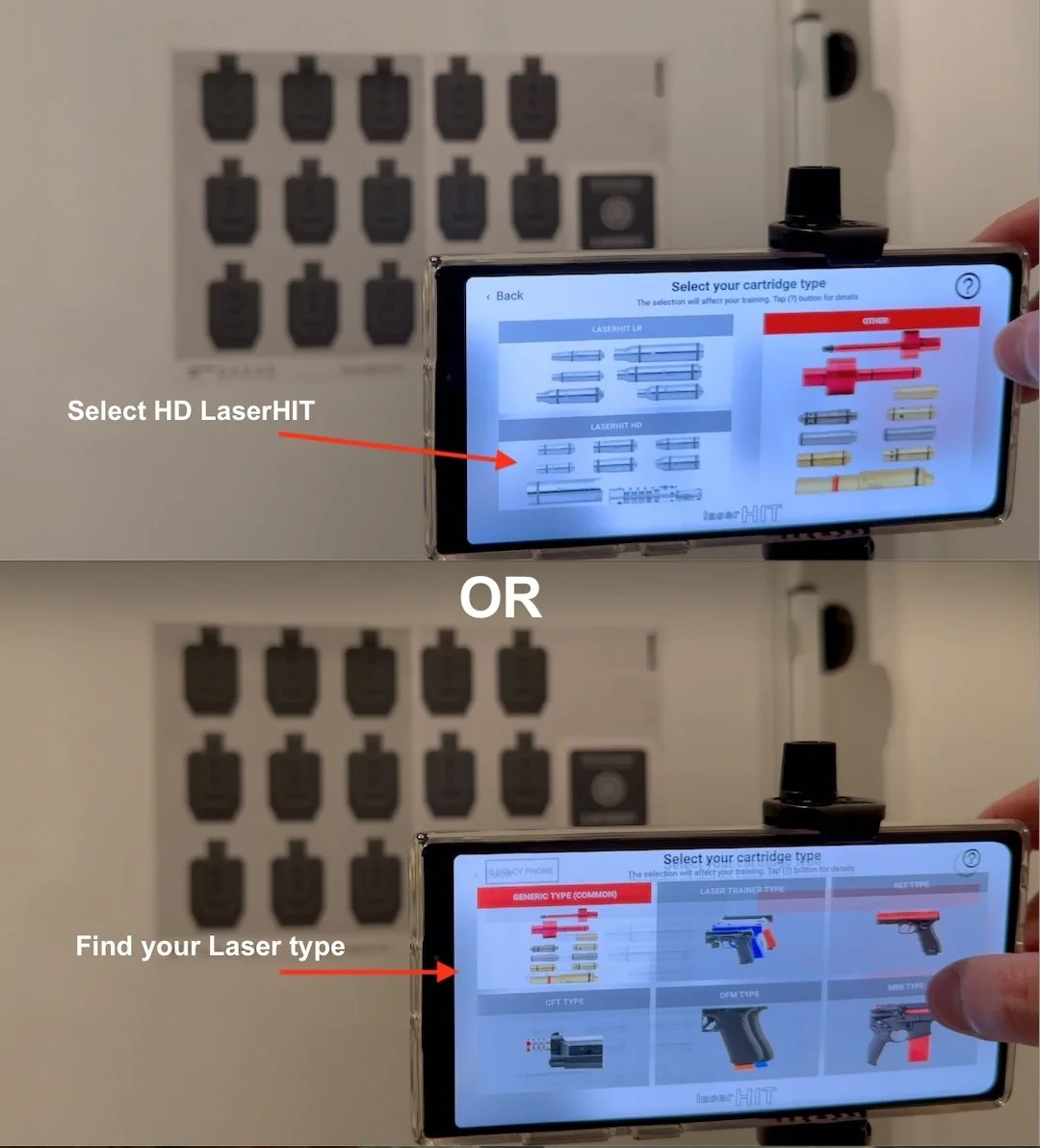
Make sure you select the correct laser cartridge type in the App settings. An incorrect selection may cause ghost shots or double shot registration.
The Objectives page is your starting point for understanding what the Drill measures, which targets and equipment are supported, and how to prepare for it.
SIMPLE SETUP. RELIABLE RESULTS.
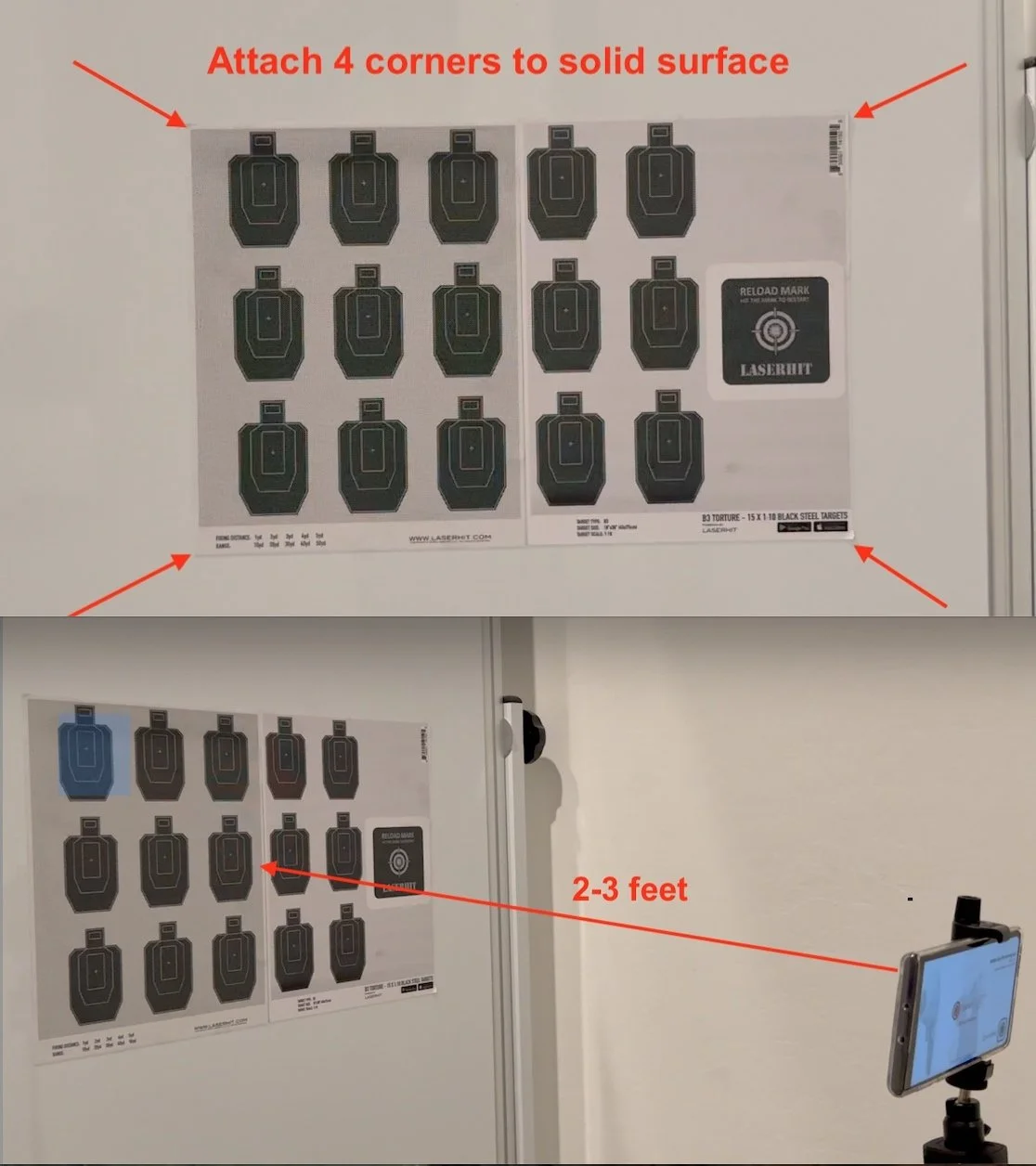
Forget the complicated setups and expectations created by dry-fire advertising. Reliable laser shot registration starts with a few practical, common-sense steps.
Keep your phone stable. Choose a secure location where the camera has a clear, unobstructed view of the entire target.
Secure your target to a solid surface. Avoid loosely hanging targets that can move or vibrate. Unexpected movement may confuse the camera and cause false or duplicate shot registration.
Avoid direct sunlight behind the target. Don't attach targets to windows or window shades. Reflections, changing light, and background movement can interfere with target recognition and shot registration.
Watch the lighting behind your firing line. Direct sunlight or strong light sources behind you can create moving shadows and reflections across the target area, affecting camera performance.
Position your phone or tablet horizontally. Use a stable tripod or mount in landscape orientation. This gives the camera a wider horizontal view of your target arrangement and provides more room for information on the screen.
Keep your device close to the target, not the shooter. Some modern advertisements show the phone positioned beside the shooter, several yards away from the target. But consider this: could you read the fine details on a US map hanging on a wall five yards away? Why should we expect a phone camera to perform an eagle-vision miracle? For reliable and repeatable shot registration, the camera needs a clear, detailed view of the laser point of impact (POI). For immediate feedback, use Virtual Spotter announcements, mirror your screen to a larger TV or projector, or activate Digital Zoom to review results through your scope.
Pay attention to App warnings. If the App detects insufficient lighting, zoom limitations, or device-related performance issues, a notification appears in the top panel. Tap it to review the details and make the necessary adjustments.
EXPRESS SETUP. LESS TIME ADJUSTING. MORE TIME PRACTICING.
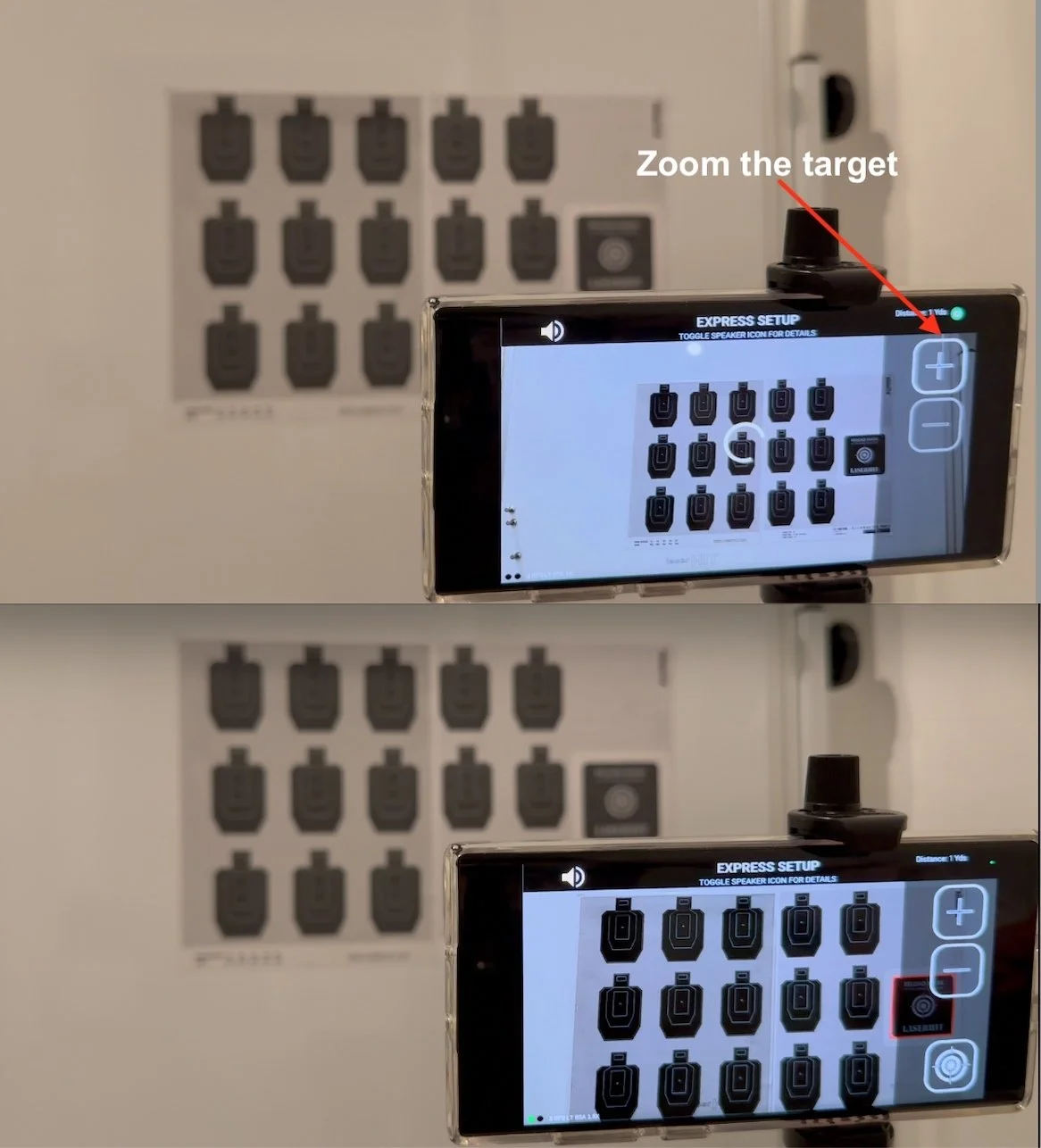
Once you've selected a Drill, Express Setup helps you prepare your Firing Range without manually configuring every Practice option.
A few recommendations before you begin:
Use Zoom on Target. Adjust the camera zoom to make the target and Reload Mark as large as practical while keeping both fully visible within the screen. This helps improve shot registration precision.
Keep the entire Reload Mark visible. Make sure the complete Reload/Reset Mark, including its white border, remains within the camera view.
Remember, you're practicing with your own firearm and sights. Your setup should support your natural shooting position, not force you to change it.
Always verify that your firearm is unloaded and that no live ammunition is present in your dry-fire training area.
YOUR ROOM IS SMALL. YOUR TARGET DISTANCE DOESN'T HAVE TO BE.
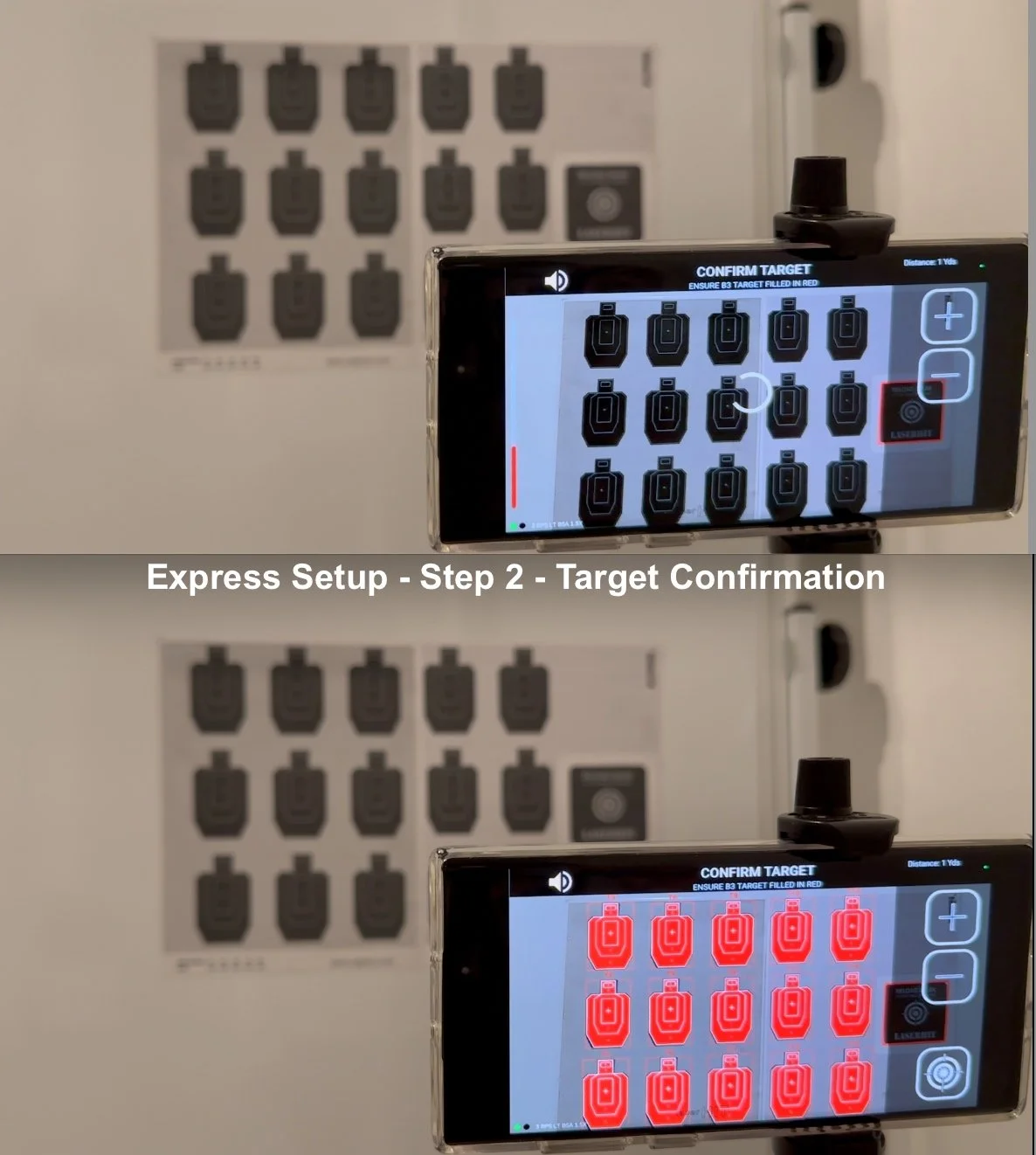
One of the most useful principles behind LaserHIT is target scaling.
A proportionally reduced target can recreate the angular dimensions of a full-size target at a longer distance.
For example, the LaserHIT B3 ×15 target sheet uses a 1:10 scale. Place it just 1 yard away, and you can practice on 15 targets with angular dimensions corresponding to full-size targets at 10 yards.
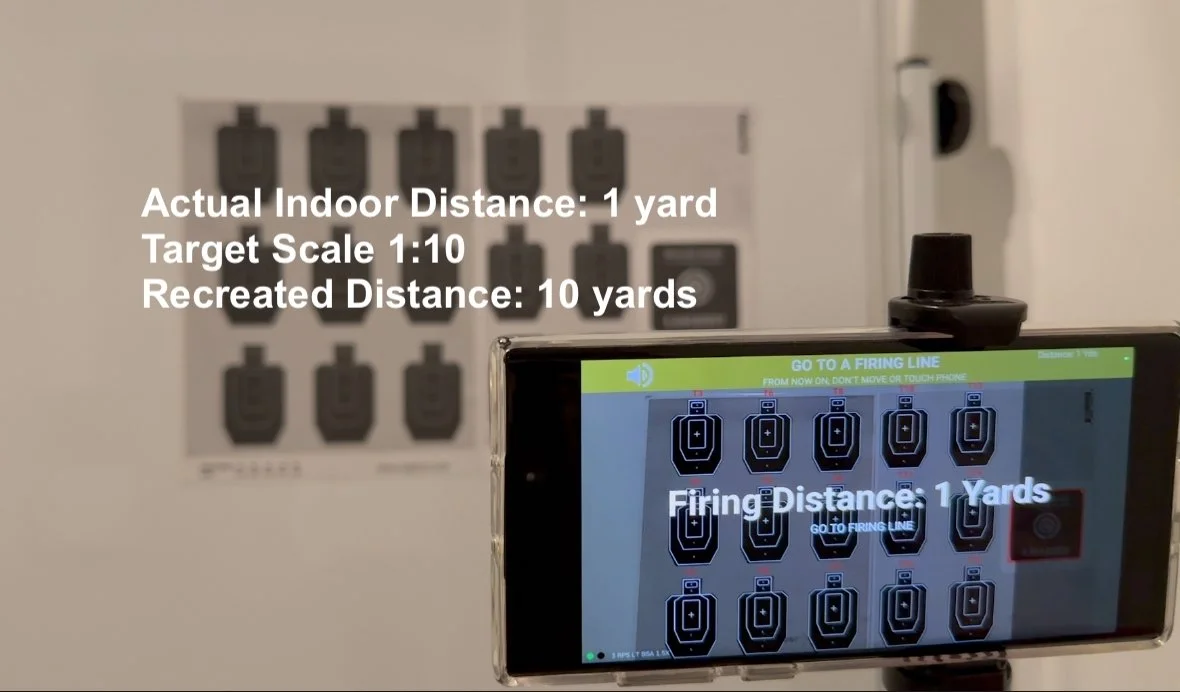
This principle allows you to work on accuracy, precision, and target transitions without needing a full-size shooting range.
Target scaling also makes it possible for LaserHIT rifle Drills to recreate target distances far beyond the space available in your home.
Keep in mind that target scaling recreates angular dimensions at different distances. It does not reproduce the external ballistic conditions of live fire, such as bullet drop or wind drift.
YOUR RESULTS SHOULD SPEAK IN REAL NUMBERS.
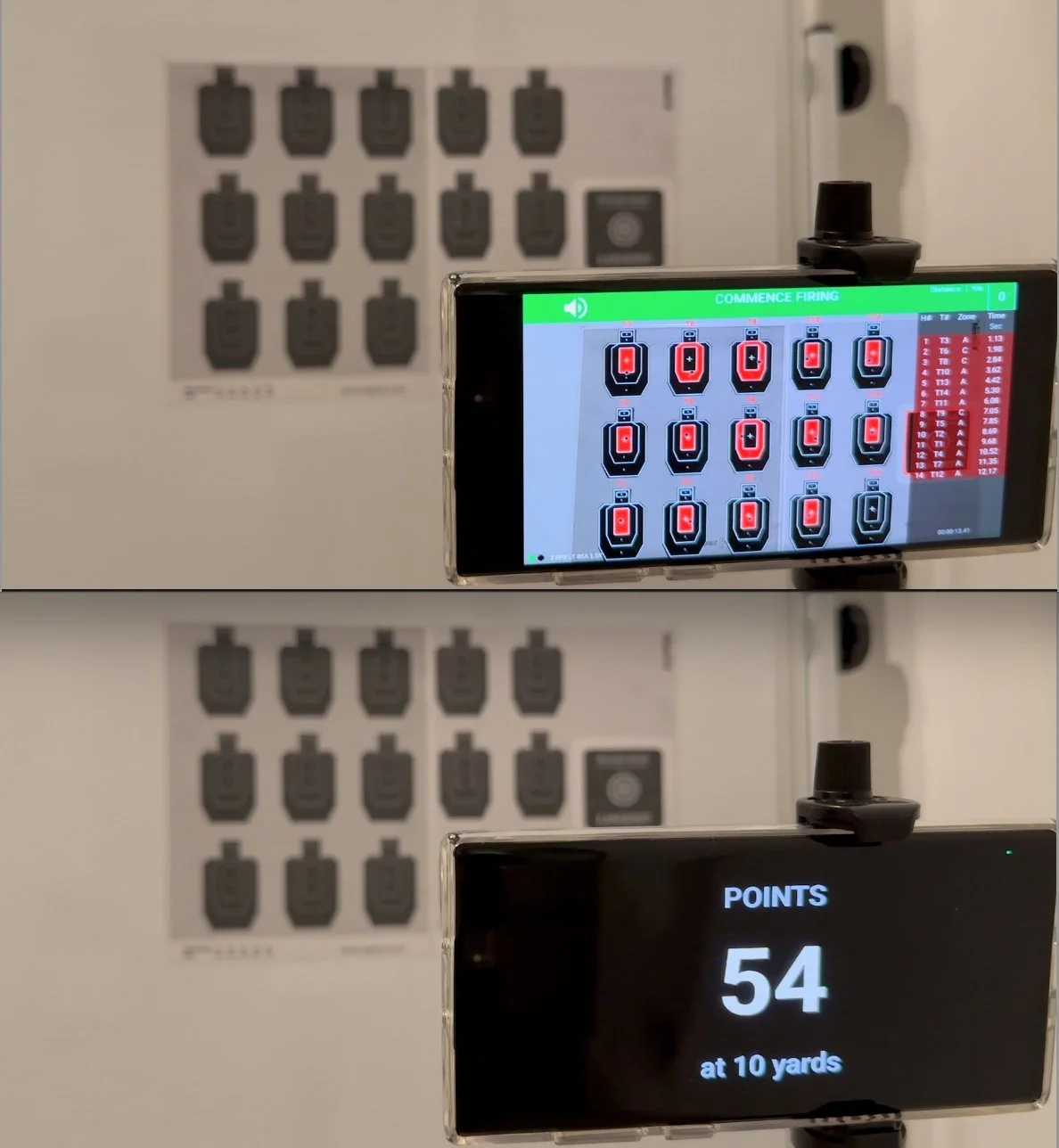
What exactly does the LaserHIT App measure?
LaserHIT Drills evaluate shooting performance using registered laser shot locations, timing, target geometry, and Drill-specific scoring rules.
The measurements depend on the selected Drill and the shooting skill you're working to improve.
Shot placement measured in inches, based on the actual registered point of impact (POI), not estimates calculated from prolonged laser trails.
Shot timing measured in fractions of a second, including reaction time, shot intervals, and Drill completion time, where applicable.
Scoring points based on the registered POI of each shot.
Zone scoring, including hits within designated scoring areas and zones engaged in a required sequence.
Precision measured by shot grouping.
Accuracy measured by the distance between the registered POI and the intended aiming point.
Readiness to deliver hits within the A-zone under time pressure.
Multiple-target transitions, measuring hits, misses, and completion time.
WORLD RECORD SERIES speed shooting, measuring performance against legendary shooting benchmarks.
Rifle target acquisition speed at recreated distances from 100 to 500 yards.
Rifle target acquisition accuracy at recreated distances from 100 to 500 yards.
All LaserHIT Drills use inches as their default measurement unit. Classic Practices offer additional measurement options, including centimeters, MOA, MIL, and MRAD.
Different Drills measure different aspects of shooting performance. The purpose is the same: give you meaningful results you can understand, compare with your results at the live-fire range, and use to evaluate your progress.
ONE GOOD GROUP IS NICE. TEN CONSISTENT GROUPS ARE BETTER.
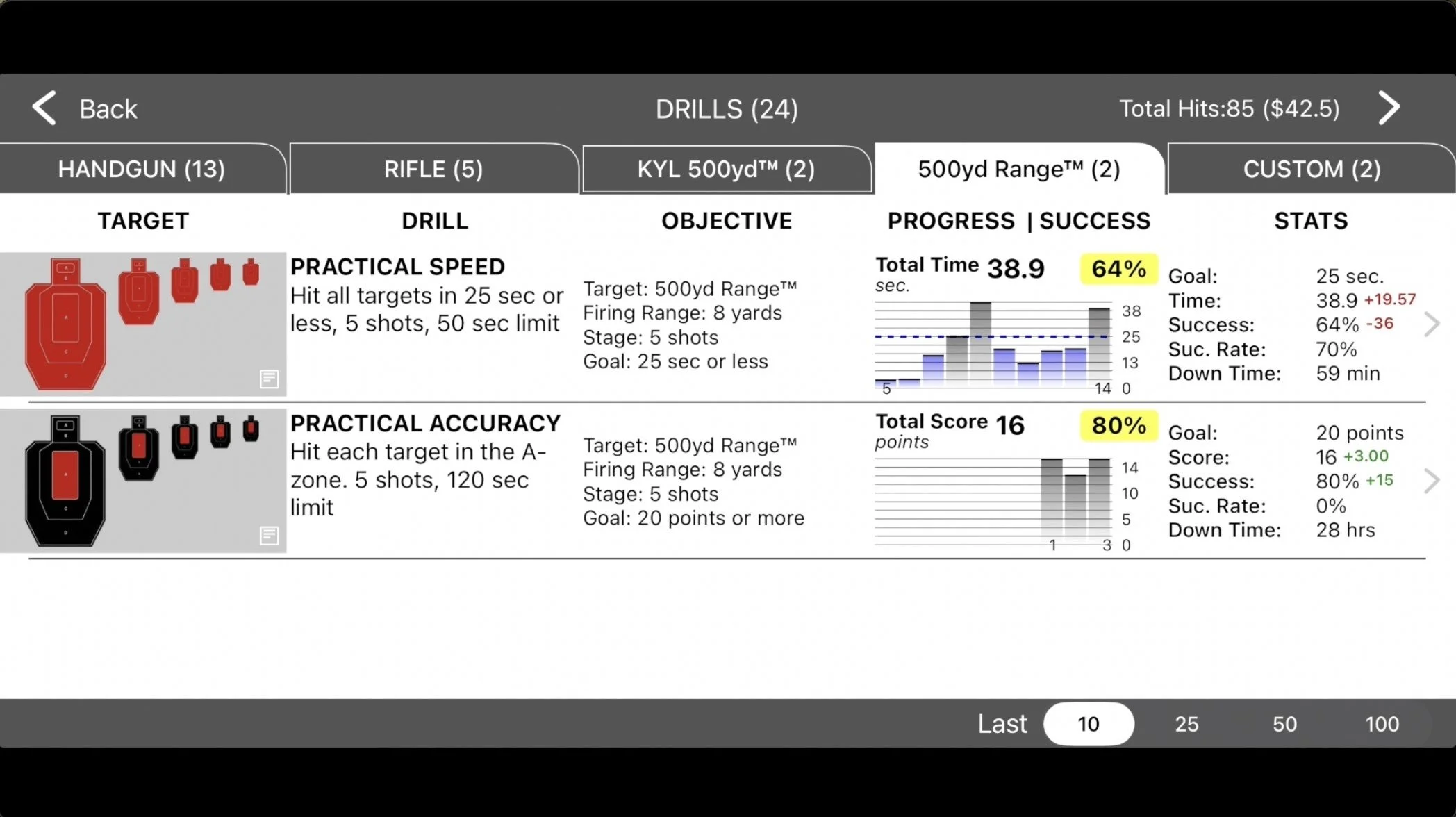
A single successful Drill shows what you accomplished in one session.
Your Progress and Success Reports help you understand whether you can repeat that performance.
Use these reports to compare your results over time. Are your groups getting smaller? Are you completing the Drill more consistently? Can you maintain accuracy under increasing time pressure?
Here's a practical training idea: repeat the same Drill across several sessions before changing your training objective.
Consistency is a more meaningful measure of improvement than one exceptional result.
You can also review your completed Practice sessions through temporarily saved screenshots before returning to the main Drills screen. Swipe left or right to browse your results, and save any screenshots you want to keep, complete with timestamps, directly to your device's Photos.
HOW MUCH LIVE-FIRE AMMUNITION WOULD THAT TAKE?
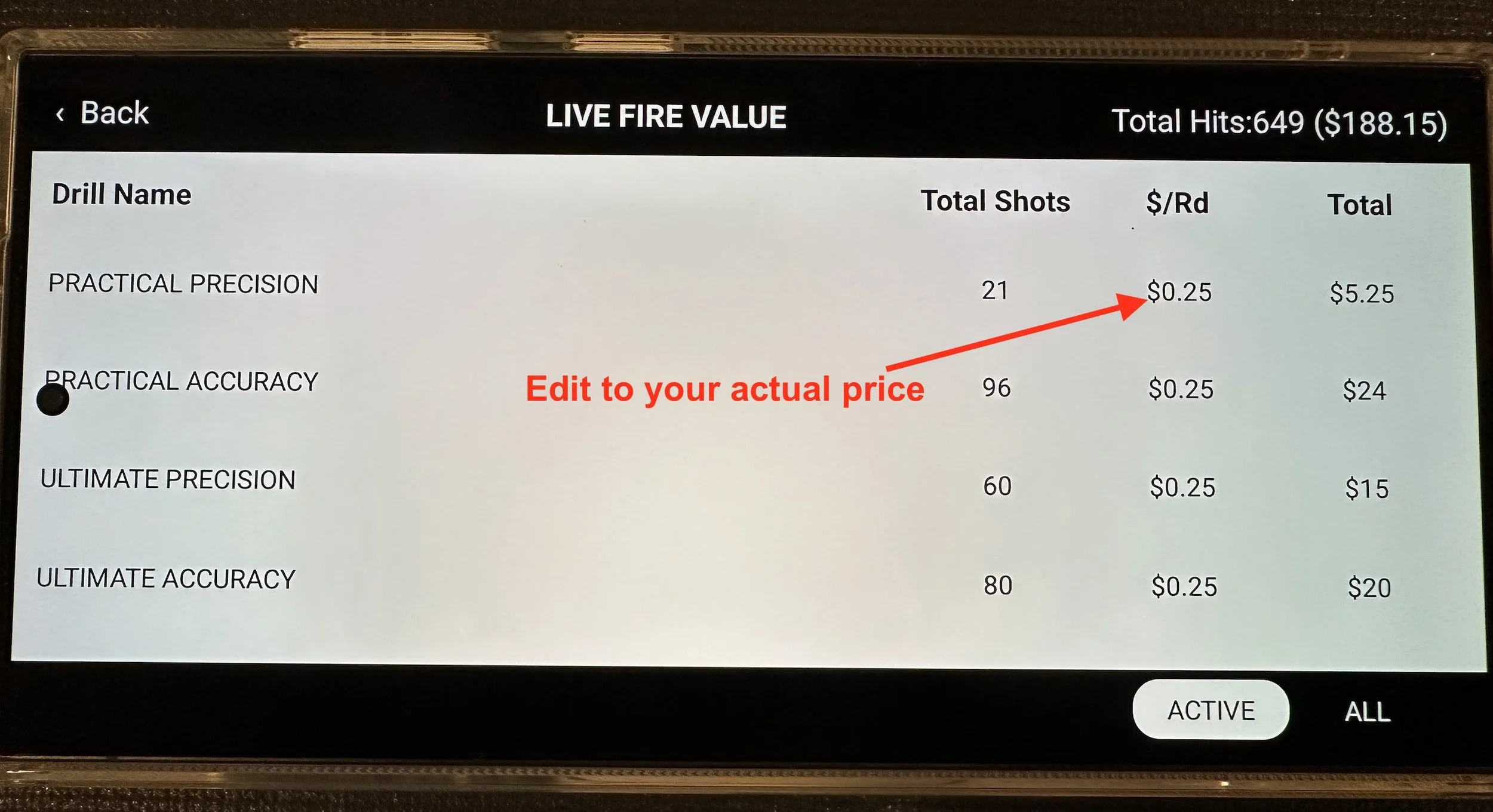
Here's another way to look at your indoor practice.
The LIVE FIRE VALUE screen estimates how much you would spend on ammunition to fire the same number of shots at a live-fire range.
Enter your own ammunition cost per round for each individual Drill. The App uses your completed shot count to calculate the equivalent ammunition value.
It's not a measure of training effectiveness or a replacement for live-fire practice. It's simply a practical way to put a dollar value on the ammunition represented by your dry-fire repetitions.
And because you set the cost per round, the calculation can reflect the actual ammunition you use for your handgun or rifle.
BEFORE YOU GO
16 free Drills. 16 opportunities to work on different shooting skills, measure your performance, and build confidence through practice.
Your firearm. Your available space. Your training goals.
And your data stays yours.
LaserHIT works offline, requires no user account, and keeps your training records on your device.
We DO NOT track your practice, or collect your training data, or sell it to anyone. Period.
That's what LaserHIT is here to support: your practice, your progress, and your privacy.
© 2026 LaserHIT. All rights reserved.
Original technical content, product descriptions, illustrations, and training documentation published by LaserHIT are protected by copyright. Any reproduction, reposting, adaptation, or reference to LaserHIT content from our website, mobile apps, or blog must clearly acknowledge LaserHIT as the original source and credit its authorship.