
Sounds of LaserHIT Training
Sounds of LaserHIT Training
LaserHIT is known for realistic laser dry fire training, and one of the biggest contributors to that realism is sound. The app uses sound the same way a real range uses it: to guide you, alert you, correct you, and support your focus. What seems simple is actually a layered audio system designed to keep you aware, motivated, and in control of every moment of your training.
Navigation and Safety Sounds
The first layer is the ambient sound layer. These are the subtle audio cues that help you understand what is happening as you move through the app. You will hear confirmation tones when navigating between screens, notifications when the phone detects unwanted movement, and on Android devices a dedicated Sound Test used to confirm speaker and hardware stability.
These sounds are not decorative. They serve as quick indicators that the app and your device are ready and stable for training.
Range Command Sounds
Just like at a real shooting range, LaserHIT uses range command cues to keep your timing consistent. These include Get ready, Commence firing, and Cease fire. A start delay beep may sound before the stage begins, followed by a random timer that initiates the firing window. These cues keep you honest, build reaction speed, and create realistic pressure.
For drills that repeat multiple cycles, you will also hear iteration progress sounds. These tones signal when one attempt ends and the next begins, helping you maintain rhythm without looking at the screen.
Range commands help keep the training fair when multiple shooters practice together because everyone starts under the same audio conditions.
Shooting Response Sounds
One of the most important sound layers is the immediate hit response. When the laser strikes the target, the app plays a sound matched to the type of impact. This feedback tells you what happened without shifting your eyes away from your sights.
Different sounds indicate:
• paper target hits
• steel target hits
• bullseye hits
• vital zone hits
• miss hits
Penalty beeps also alert you to early shots, invalid timing, or expired windows. Over time, you begin to associate these tones with performance, the same way live shooters learn the sound of steel hits or range timers.
Virtual Spotter
Your Virtual Spotter is one of the most valuable audio tools in the app. It is highly customizable and can be tailored to your training needs. You can choose to hear shot placement after each hit, receive a summary report after a full stage, or practice in complete silence. You are always in control of how much feedback you want.
Sound Bar Controls
The app includes a Sound Bar located on each practice screen that allows you to manage all audio during your training. The selection of available male and female voices and dialects depends on your mobile device model and brand, since each platform provides its own set of system voices. You can also adjust the pitch tone and the speaking speed to match your preference. These customizations let you choose a voice that is comfortable and easy to understand during long practice sessions.
During Express Setup the Sound Bar is turned off by default, but you can activate it manually at any time during an active practice session. It becomes especially helpful during the first time setup, when the app provides detailed step by step audible instructions. If you tap or make a selection while a voice instruction is playing, the guidance for that specific screen will stop immediately, allowing you to continue the setup at your own pace.
Custom Voice Reports on iOS
The iOS version goes even further by allowing fully custom Voice Reports. These are personalized voice messages triggered when specific training conditions are met. To create one, open More Settings within any practice and enable Voice Reports.
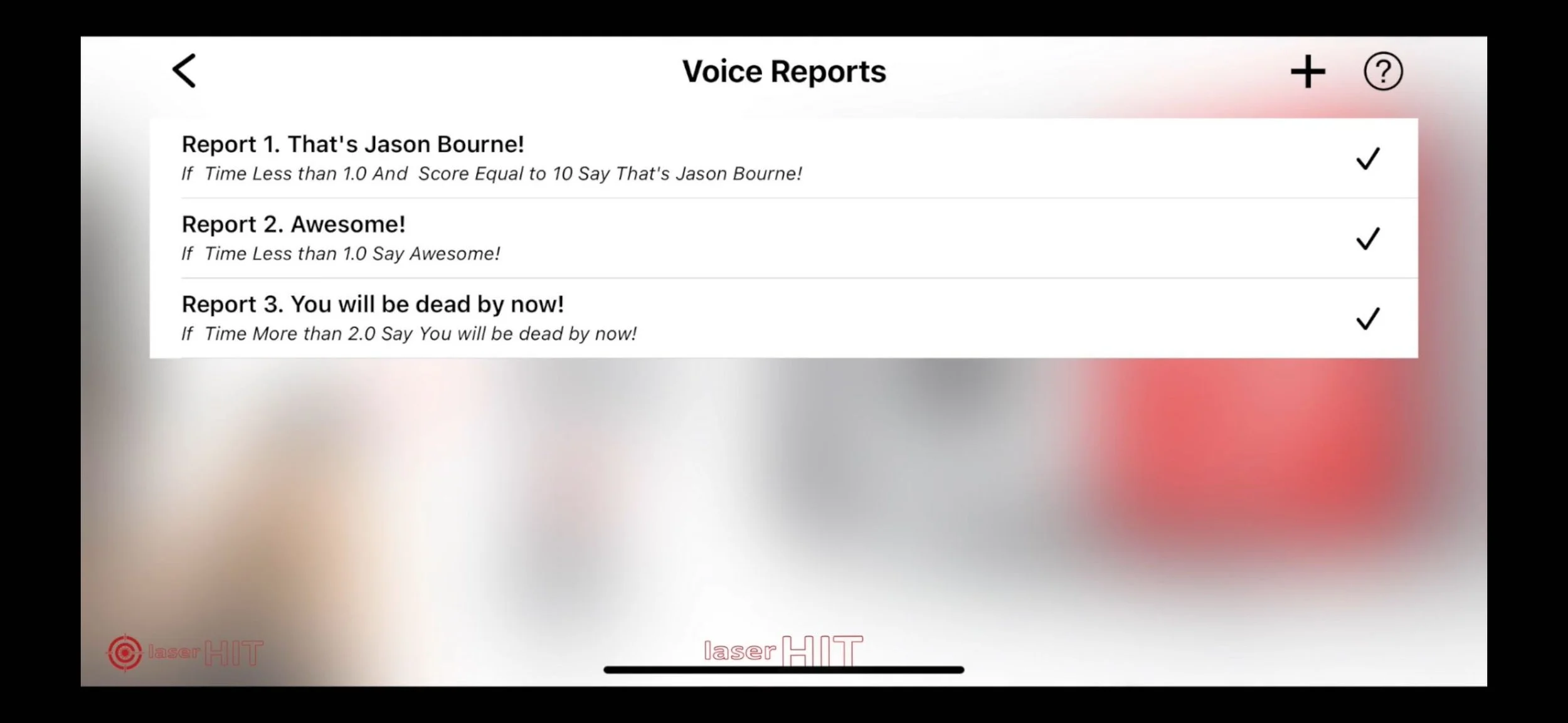
When building a Voice Report:
Tap the plus button to create a new message.
Select the conditions you want the app to evaluate. Examples include total hits, overlap, group size, total time, scoring, or zones.
Define the rules such as equal, less, or greater.
Type the custom phrase you want spoken aloud.
Tap on your created report to activate it.
When your results match the conditions you set, the Virtual Spotter will announce your custom message.
For example:
Total hits equal 10, Overlap greater than 2, Group size less than 1 inch.
Message: That is Awesome.
You can create multiple Voice Reports with different messages for different scenarios. The app evaluates your final results and plays the first report whose conditions match.
Before You Go
The sound design in LaserHIT is not an accessory. It is a training tool that helps build consistency, awareness, reaction time, and discipline. Whether you rely on hit confirmation, timing cues, penalties, or the Virtual Spotter, each sound supports a specific part of the training process.
LaserHIT gives you full control to build the sound environment that works for you. You can train quietly, or train with guided voice feedback and stage reports. You can even create your own personal audio cues that react to your performance in real time.